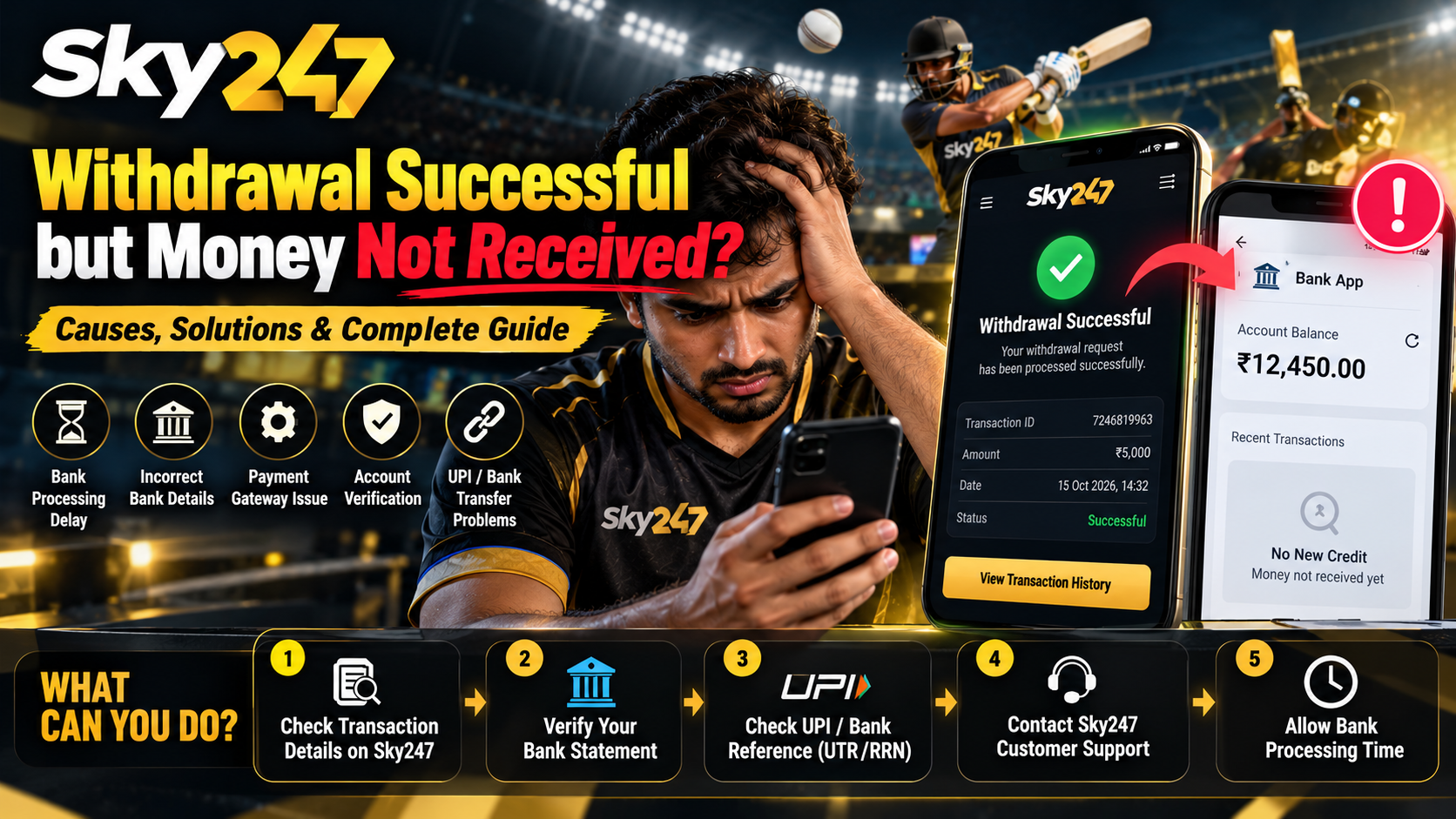
You’ve requested a withdrawal, checked your Sky247 account, and noticed that the transaction status says “Successful.” Naturally, you open your banking application expecting to see the money. But your bank balance hasn’t changed.
This situation can be frustrating, especially when you’re unsure whether the payment is delayed, being processed, or has encountered a technical problem.
If your Sky247 withdrawal shows as successful but the money has not reached your bank account, the first thing to understand is that a completed status on a platform does not always confirm that the receiving bank has credited the funds.
Several factors can affect a payment, including transaction processing, bank reconciliation, incorrect beneficiary details, and payment gateway issues.
Rather than repeatedly submitting withdrawal requests or changing account details, it’s better to identify exactly where the transaction stands.
In this guide, we’ll explain the possible reasons behind a Sky247 withdrawal problem, how to check your payment status, what information to collect, and how to follow up safely.
Read More<<<Sky247 Payment Methods 2026: UPI, Bank Transfer & Withdrawal Guide
What Does “Withdrawal Successful” Mean on Sky247?
When a withdrawal is marked successful, users may assume that the money has already reached their bank accounts.
However, a transaction can involve several stages before the recipient sees the final credit.
Depending on how the payment system works, a successful status may indicate that a withdrawal request has been approved or that payment instructions have been sent to a processing provider.
It does not necessarily prove that the beneficiary bank account has received the funds.
Understanding Sky247 Withdrawal Statuses
| Withdrawal status | What it may indicate | Recommended action |
|---|---|---|
| Pending | The withdrawal request is awaiting review or processing | Check the transaction details |
| Processing | The platform or payment provider is handling the request | Avoid submitting duplicate requests |
| Successful | The platform has marked its part of the transaction complete | Verify the actual bank credit |
| Failed | The withdrawal could not be completed | Check the stated reason |
| Rejected | The request did not meet a requirement | Review account or payment information |
| Reversed | The payment has been returned or cancelled | Verify where the funds were restored |
These descriptions are general payment-processing examples. Sky247’s exact status labels and their meanings should be verified against its current interface.
The important distinction is between platform withdrawal status and bank transaction status.
Why Is Your Sky247 Withdrawal Successful but Money Not Received?
There isn’t always one explanation for a missing withdrawal. Sometimes the issue is a temporary delay, while in other cases the transaction requires additional investigation.
Here are several possibilities worth checking.
1. Bank Processing or Settlement Delays
A payment may take time to appear in your bank account even after the sending platform marks it as completed.
Delays can arise from transaction verification, internal bank reconciliation, or issues involving payment-processing partners.
For example, imagine a user requests a withdrawal of ₹5,000. Their transaction history later shows “Successful,” but their bank statement contains no matching credit.
The useful next step is not to assume the money has disappeared. Instead, the user should request a verifiable payment reference and establish whether the receiving bank has processed the transaction.
2. Incorrect Bank Account Details
Incorrect payment information can prevent a transfer from reaching the intended recipient.
Potential problems include:
- An incorrect bank account number.
- Incorrect IFSC information.
- An outdated or closed bank account.
- A mismatch between registered beneficiary information and bank records.
- Incorrect UPI details, where UPI withdrawals are supported.
Users should review their saved withdrawal information carefully.
Never send complete banking credentials, passwords, or confidential authentication details through public chats or unverified messaging accounts.
3. Payment Gateway or Processing Issues
Online payment transactions may involve external payment providers.
A transaction can be affected by technical interruptions, network failures, reconciliation issues, or delayed responses between connected systems.
In such situations, a platform may display a completed status while the bank credit still requires verification.
Users should request the external transaction reference, if one was generated, rather than relying entirely on the platform’s internal withdrawal ID.
4. Bank Account Restrictions
Certain bank-level restrictions can interfere with incoming transfers.
Examples include inactive accounts, compliance-related restrictions, account closure, and problems with beneficiary information.
If the platform confirms that funds were transferred, the user can contact their bank and ask whether the payment was received, held, rejected, or returned.
5. Account Verification or Compliance Review
Some financial transactions may require identity verification or additional account checks.
If Sky247 indicates that a withdrawal is under review, users should request an explanation of the outstanding requirement.
However, a demand for an unexpected additional payment to “unlock” or “release” an existing withdrawal should be treated as a warning sign.
6. Incorrect or Misleading Transaction Status
Sometimes the problem is not the underlying payment but the information displayed in the account dashboard.
A transaction record can be delayed, outdated, or incorrectly updated.
If the withdrawal is marked successful but no independent payment reference can be supplied, the transaction may need further investigation.
Users should retain screenshots and written correspondence until the matter is resolved.
Read More<<<Sky247 Registration Guide: Create Your Account Step by Step
Sky247 Withdrawal Successful but Not Credited: Step-by-Step Troubleshooting
When your withdrawal is missing, following a clear process can help prevent unnecessary confusion.
Step 1: Check Your Sky247 Login and Transaction History
Start by accessing your account through a website or application you have independently verified.
After completing your Sky247 Login, locate the wallet, account statement, or transaction history section, if these features are available.
Find the relevant withdrawal request and record:
- Withdrawal amount.
- Date and time of the request.
- Transaction status.
- Internal withdrawal reference.
- Selected payment method.
- Any available payment remarks.
Avoid assuming the transaction was completed simply because the requested amount was deducted from your platform balance.
Step 2: Review Your Bank Statement
Open your banking application or obtain a recent transaction statement.
Check for a credit matching the amount of your withdrawal.
Remember that some incoming payments may appear under a payment provider’s name rather than the name of the original platform.
Review the complete transaction list instead of checking only the available balance.
Step 3: Look for the External Payment Reference
A platform withdrawal ID and a banking transaction reference are not necessarily the same thing.
Depending on the payment method, a completed transfer may have a reference such as a UTR, RRN, or another bank-generated identifier.
If Sky247 claims a payment was completed, request the relevant reference from its authenticated Sky247 support channel.
The reference can help your bank investigate whether the transfer reached its processing system.
Step 4: Confirm Your Registered Withdrawal Details
Check whether the bank account or payment identifier associated with your withdrawal is correct.
Be cautious about changing beneficiary information while an existing withdrawal is under investigation.
Changing details usually does not redirect a transfer that has already been submitted.
Step 5: Contact Verified Sky247 Customer Support
If the payment remains missing, report the issue using a Sky247 support channel independently verified as belonging to the service.
Explain that your Sky247 withdrawal is marked successful but has not appeared in your bank statement.
Provide the withdrawal reference, amount, date, and a clear description of the issue.
Do not disclose your password, OTP, UPI PIN, or complete card details.
Step 6: Contact Your Bank
If the platform provides a valid external transaction reference, ask your bank whether the payment has been received or returned.
If the bank cannot locate the transaction, keep its written response or complaint reference.
This information may help establish whether further investigation is required by the sending party or payment provider.
Sky247 UPI Withdrawal Successful but Amount Not Credited
UPI is widely used in India for digital payments. However, availability of UPI as a withdrawal method on a particular Sky247 account must be verified.

If a withdrawal was genuinely sent through UPI, the transaction should have a traceable payment record.
A UPI payment delay may involve the sending institution, receiving bank, or the payment system.
For bank transfers processed through UPI, the National Payments Corporation of India (NPCI) guides transaction status and payment-related complaints.
Users can contact their bank or use an applicable official payment grievance process when the transaction cannot be resolved.
What Should You Check?
| Item | Why it matters |
|---|---|
| UPI transaction reference | Helps identify the transfer |
| Payment amount | Confirms the disputed value |
| Transaction date | Identifies the relevant processing period |
| Beneficiary account | Confirms the intended destination |
| Bank statement | Helps establish whether credit occurred |
| Platform withdrawal ID | Helps locate the original withdrawal request |
Important: Do not send another payment to a person claiming they can manually activate, verify, or release your pending withdrawal.
Sky247 Withdrawal Through Bank Transfer: Common Problems
Bank transfers involve payment information supplied by the sender and processed by banking systems.
If your Sky247 Bank Transfer withdrawal shows as successful but the amount is missing, determine whether the payment has actually been initiated.
A platform-generated confirmation alone may not be sufficient evidence of final settlement.
Ask whether the payment provider has supplied a verifiable transfer reference.
If the transfer was rejected or returned, the sender should explain what happened to the funds and the process for resolving the failed payout.
Avoid making another withdrawal request until the original transaction has been accounted for.
How Long Does a Sky247 Withdrawal Take?
There is no single processing time that can be safely applied to every Sky247 withdrawal.
Actual timing can depend on several factors, including:
- The withdrawal method used.
- Account verification requirements.
- Whether the platform has approved and initiated the payment.
- The payment service provider.
- The receiving bank’s processing status.
- Any technical or compliance-related review.
Users should rely on the current terms applicable to their own accounts, rather than assuming a fixed
Sky247 Withdrawal Problem: What Information Should You Share With Support?
Providing accurate transaction details can help support teams identify the issue.
A missing-payment complaint should be specific and easy to understand.
Sample Sky247 Withdrawal Complaint
Subject: Sky247 Withdrawal Marked Successful but Money Not Received
Hello Support Team,
I am contacting you regarding a withdrawal that is showing as successful in my account, but the amount has not been credited to my bank.
Please find the transaction details below:
- Sky247 ID: [Account username or masked identifier]
- Withdrawal Amount: ₹[Amount]
- Withdrawal Date: [Date]
- Withdrawal Reference: [Transaction ID]
- Payment Method: [Bank Transfer / UPI / Other]
- Current Status: Successful
- Issue: Amount not received in my bank account
I have checked my bank statement and could not identify a matching credit.
Please confirm whether the withdrawal has been transferred to the payment provider or receiving bank. If the transfer has been completed, kindly provide the relevant payment reference so that I can investigate with my bank.
Thank you.
Security reminder: Share transaction records only through verified, secure support channels. Mask unrelated transactions and sensitive financial information in screenshots.
How to Avoid Sky247 Withdrawal-Related Scams
A missing withdrawal can make users vulnerable to people claiming they can release funds faster.
Fraudsters sometimes impersonate support representatives and offer urgent payment assistance.
Be cautious of anyone who:
- Requests an extra deposit to release a withdrawal.
- Asks for your bank PIN, UPI PIN, or account password.
- Requests an OTP supposedly required to receive money.
- Demands remote access to your phone.
- Sends unfamiliar APK files for payment verification.
- Claims that a fee guarantees immediate settlement.
Legitimate complaint investigation should not require sharing private authentication credentials.
If an unfamiliar person contacts you about your Sky247 Withdrawal Problem, verify their identity through an independent support channel before responding.
Difference Between Sky247 Withdrawal Pending and Successful
Users sometimes confuse pending withdrawal requests with completed transactions that have not yet reached their bank accounts.
These are two different situations.
Sky247 Withdrawal Pending: The request may still be undergoing processing or review. The user should confirm whether payment instructions have been initiated.
Sky247 Withdrawal Successful but Money Not Received: The platform reports completion, but the user cannot identify the corresponding bank credit. This requires checking external payment evidence and the receiving account.
Understanding the distinction helps users explain their issue accurately to support representatives.
When Should You Escalate a Missing Withdrawal?
Escalation becomes appropriate when the reported payment status cannot be reconciled with bank records, the applicable processing timeframe has passed, or the support team cannot supply meaningful transaction details.
Start by keeping a written record of your complaint and requesting a reference number.
If a genuine bank transfer reference is available, contact the relevant bank for investigation.
Where a regulated payment provider is involved, use its applicable grievance procedure. If the platform itself fails to resolve the issue, consider appropriate consumer, legal, or regulatory remedies based on the jurisdiction and the service’s actual legal status.
Avoid repeatedly depositing money or paying unverified release fees in an attempt to recover a missing withdrawal.
Frequently Asked Questions
1. Why is my Sky247 withdrawal successful but money not received?
Possible reasons include payment-processing delays, incorrect beneficiary information, bank restrictions, or inaccurate platform status reporting. A successful status does not by itself verify bank credit.
2. What should I do if my Sky247 withdrawal is not credited?
Review the transaction record, confirm your bank statement, request an external payment reference, and contact verified support. If a bank reference exists, ask your bank to trace the payment.
3. Can a successful Sky247 withdrawal still be delayed?
Yes. A platform may report that its internal withdrawal process has finished before the receiving bank records the payment. The exact meaning depends on the platform’s payment system.
4. What is a UTR number in a Sky247 withdrawal?
A Unique Transaction Reference (UTR) or another payment reference can help identify a bank transfer. The relevant identifier depends on the actual payment rail used.
5. What happens if my Sky247 withdrawal is rejected by the bank?
A rejected transfer may be returned to the sending financial institution or payment provider. Request written clarification about the transfer status and any return or reversal process.
6. How can I check my Sky247 withdrawal history?
After using a verified Sky247 Login page, look for the account statement, wallet history, or withdrawal records if those functions are supported by the platform.
7. Can Sky247 customer support trace a missing withdrawal?
An authenticated support team may be able to investigate the platform’s own records and obtain payment-provider information. Whether it can independently trace a bank transfer depends on its payment arrangements.
8. Should I pay an extra fee to release my Sky247 withdrawal?
Do not pay unexpected fees demanded by unverified individuals. Any legitimate fee must be established by the applicable terms and authenticated by the provider. Requests for deposits to unlock missing money are a significant fraud warning sign.
9. Is a Sky247 ID required to report a withdrawal problem?
A support team may need a transaction ID or masked account identifier to locate a withdrawal. Never share your account password or other authentication secrets.
10. What if the bank says no payment was received?
Ask for confirmation of the bank’s investigation and return to the sending provider with the evidence. Request a traceable payment reference or proof of transfer rather than relying on a dashboard screenshot alone.
Conclusion
Seeing Sky247 Withdrawal Successful but Money Not Received can be worrying, particularly when the money has already been deducted from your account balance.
However, the best response is to investigate the transaction carefully rather than immediately assuming that the payment has been lost.
Start by checking your withdrawal history, reviewing your bank statement, and confirming that your beneficiary details are accurate. If the money remains missing, request a traceable payment reference through verified support and contact your bank where appropriate.
Above all, protect your personal information, avoid suspicious payment demands, and maintain records of every support interaction.
A successful withdrawal status is not the same as confirmed bank credit. Always verify the transaction through reliable financial records.
Disclaimer: This guide provides general payment troubleshooting information. It does not verify Sky247’s licensing, payment methods, processing times, or legal availability in India. Users should check applicable local laws and the service’s current verified terms.